
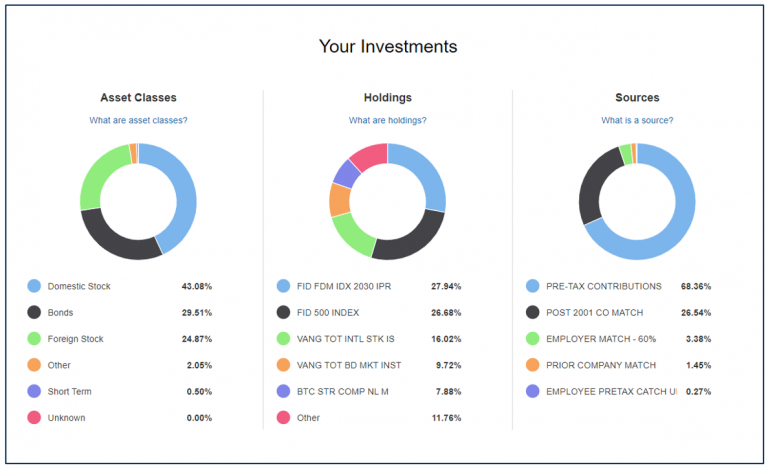
Retirement planning often feels overwhelming for young professionals. Between student loans, career uncertainties, and market volatility, envisioning a secure financial future can seem like a distant dream. But what if you could turn raw numbers into actionable insights, simulate countless retirement scenarios, and track your progress in real time—all within a single platform? Enter Power BI, Microsoft’s powerhouse business intelligence tool, which is revolutionizing how financially savvy individuals approach retirement planning.
In this guide, you’ll discover how to harness Power BI’s data visualization, predictive analytics, and scenario modeling tools to build a retirement plan tailored to your goals. Whether you’re a trader analyzing market trends or a business professional optimizing savings, this article will equip you with actionable strategies to take control of your financial future.
Why Traditional Retirement Planning Tools Fall Short
Most young adults rely on spreadsheets or generic retirement calculators, but these tools have critical limitations:
- Static Data: Manual updates lead to outdated projections.
- Limited Scenario Testing: Testing “what ifs” (e.g., market crashes, career changes) is time-consuming.
- Poor Visualization: Spreadsheets fail to highlight trends or risks intuitively.
Power BI addresses these gaps by enabling dynamic, automated, and visually engaging financial analysis. Let’s explore how to transform retirement planning from a guessing game into a data-driven strategy.
Step 1: Setting Up Power BI for Retirement Planning
a. Data Integration: Centralize Your Financial Life
Power BI’s strength lies in its ability to connect disparate data sources. For retirement planning, integrate:
- Bank Accounts & Loans: Track savings, debts, and interest rates.
- Investment Portfolios: Pull data from brokerage APIs (e.g., Fidelity, Robinhood).
- Income Streams: Salary, side hustles, rental income.
- Expenses: Link budgeting apps like Mint or YNAB.
Pro Tip: Use Power BI’s 100+ built-in connectors (e.g., Excel, SQL, Salesforce) to automate data refreshes. This eliminates manual entry and ensures real-time accuracy.
b. Building a Retirement Data Model
Organize your data into a structured model using Power Query:
- Clean Data: Remove duplicates, standardize categories (e.g., “401(k)” vs. “Retirement Account”).
- Create Relationships: Link tables (e.g., connect income to investments).
- Add Calculated Columns: Use DAX (Data Analysis Expressions) to compute metrics like compound growth or inflation-adjusted returns.
Example DAX Formula for Retirement Savings:
Projected Savings =
CALCULATE(
    SUM('Savings'[Monthly Contribution]) * (1 + 'Assumptions'[Annual Return])^DATEDIFF(TODAY(), 'Retirement'[Target Date], YEAR)
)
Step 2: Visualizing Your Retirement Journey
a. Key Dashboards for Retirement Tracking
Design interactive dashboards to monitor critical metrics:
- Net Worth Tracker:
- Visualize assets vs. liabilities over time.
- Use a combo chart to overlay investment growth against debt repayment 1.
- Retirement Readiness Score:
- Calculate the gap between projected savings and retirement needs.
- Apply conditional formatting (red/yellow/green) to highlight risks.
- Expense Breakdown:
- Use treemaps or Sankey diagrams to categorize spending (e.g., housing, healthcare).
Free Template: Download a pre-built Power BI retirement dashboard here (adapted from 1).
b. Scenario Modeling with “What If” Parameters
Power BI’s “What If” tool lets you simulate scenarios like:
- Market Downturns: Reduce annual returns by 5%.
- Early Retirement: Adjust the target date and withdrawal rate.
- Career Breaks: Pause contributions for 2 years to travel or upskill.
Case Study: A 30-year-old earning $80k/year modeled three scenarios:
- Aggressive Investing (8% returns): Retire at 55.
- Moderate Growth (5% returns): Retire at 62.
- Market Crash (2% returns): Delay retirement to 67.
The visual comparison helped them prioritize increasing contributions.
Step 3: Advanced Analytics for Smarter Decisions
a. Predictive Forecasting with AI
Power BI’s AI capabilities automate complex calculations:
- Time Series Forecasting: Predict future savings based on historical trends.
- Anomaly Detection: Flag unusual spending patterns impacting retirement goals.
- Monte Carlo Simulations: Model 1,000+ market scenarios to assess success probabilities (e.g., 85% chance of retiring by 60).
Pro Tip: Use the “Key Influencers” visual to identify factors most impacting your savings rate (e.g., reducing dining-out expenses boosts savings by 12%).
b. Tax Optimization Strategies
Maximize tax-advantaged accounts (e.g., Roth IRA, 401(k)) by:
- Visualizing Tax Brackets: Use area charts to project taxable income in retirement.
- Roth Conversion Analysis: Model converting traditional IRA funds to Roth during low-income years.
Step 4: Tools & Resources to Accelerate Your Plan
a. Recommended Power BI Add-Ons
- ProjectionLab: A retirement-specific tool offering Monte Carlo simulations and tax planning visuals.
- Future Finance Standard Books: A Power BI plugin for small businesses to forecast cash flow and hiring needs.
b. Learning Resources
- Coursera’s Financial Planning for Young Adults: Master budgeting, investing, and risk management.
- Books:
- The Bogleheads’ Guide to Retirement Planning: Low-cost index fund strategies.
- Quit Like a Millionaire: Retire early with geographic arbitrage.
Conclusion: From Data to Financial Freedom
Retirement planning isn’t about predicting the future—it’s about preparing for it. By leveraging Power BI’s analytics, young professionals can transform abstract numbers into a clear roadmap. Start small: automate one data source, build a single dashboard, and iterate. As your career and investments grow, your Power BI models will evolve with you, ensuring every decision aligns with your long-term vision.