
Automating Tax Season: Integrate Power BI with TurboTax for Smarter Filings
Tax season is a universal stressor, but for young adults juggling careers, side hustles, and investments, it’s a labyrinth of deadlines, deductions, and data entry. Enter Power BI and TurboTax—two tools that, when combined, transform tax preparation from a chaotic chore into a streamlined, data-driven process. This guide dives into how integrating Microsoft’s Power BI with Intuit’s TurboTax empowers you to automate workflows, uncover hidden deductions, and file with confidence.
Why Automation Matters for Young Professionals
Young adults in finance, trading, or entrepreneurship face unique tax challenges:
- Complex income streams: Freelance gigs, crypto investments, rental income, and stock trading require meticulous tracking.
- Time constraints: Balancing work and personal life leaves little room for manual tax prep.
- Fear of missed opportunities: Overlooked deductions or credits can cost thousands.
Automation solves these pain points by reducing errors, saving time, and surfacing actionable insights. A study by Intuit reveals that AI-driven tools like TurboTax’s Intuit Assist can complete tax prep in under two hours for many filers, with 100% accuracy guarantees. Meanwhile, Power BI’s dashboards turn raw financial data into visual, decision-ready reports.
Part 1: TurboTax—Your AI-Powered Tax Ally
TurboTax has evolved beyond basic tax software. Its Gen-AI-powered Intuit Assist leverages decades of tax code expertise to:
- Automate document processing: Upload W-2s, 1099s, or receipts, and the AI scans them to create a personalized checklist 1.
- Proactive deduction hunting: The AI cross-references your financial profile with current tax laws to flag credits like the Earned Income Tax Credit or student loan interest deductions 1.
- Real-time refund tracking: Monitor your expected refund or tax owed dynamically as you input data.
For business filers, TurboTax Business offers payroll automation, error checks, and seamless integration with QuickBooks for year-round bookkeeping 5.
Part 2: Power BI—The Data Visualization Powerhouse
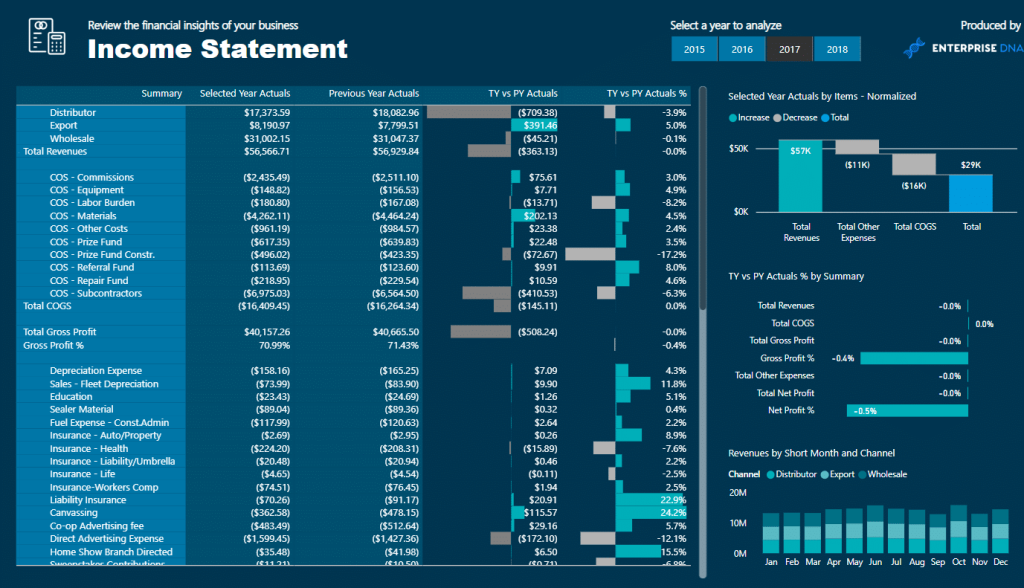
Power BI turns spreadsheets into interactive dashboards. For tax prep, it shines in three areas:
- Aggregating financial data: Sync bank accounts, crypto wallets, and investment platforms into a unified dashboard.
- Trend analysis: Spot deductible expenses (e.g., home office costs, mileage) over time.
- Scenario modeling: Compare “what-if” tax outcomes based on different filing strategies.
Example: A freelance graphic designer uses Power BI to visualize quarterly income fluctuations, deductible software subscriptions, and estimated tax payments—all feeding directly into TurboTax.
Part 3: Integrating Power BI with TurboTax—A Step-by-Step Guide
- Export Financial Data
- Use Power BI’s connectors to pull data from banks (e.g., Chase, PayPal), crypto exchanges (Coinbase), and accounting tools (QuickBooks).
- Pro Tip: Power BI’s integration with QuickBooks Time tracks project-based income and contractor payments.
- Build a Tax-Ready Dashboard
- Create visuals for:
- Income streams: W-2 salary, freelance 1099s, dividends.
- Deductible expenses: Home office, education, medical costs.
- Tax liability projections: Compare standard vs. itemized deductions.
- Create visuals for:
- Export to TurboTax
- TurboTax’s Auto-fill feature imports CSV/Excel files generated from Power BI 2.
- Case Study: A day trader uses Power BI to aggregate stock trades from Robinhood and E*TRADE, then auto-fills Schedule D in TurboTax, avoiding manual entry errors.
- Leverage TurboTax Live Experts
- Share your Power BI dashboard with a TurboTax Live CPA for personalized advice on complex filings (e.g., crypto gains or rental property depreciation) 5.
Part 4: Advanced Automation Strategies
- Year-Round Tax Planning
- Use Power BI to monitor withholding allowances and adjust W-4s proactively.
- TurboTax’s Year-Round Insights feature sends alerts for life changes impacting taxes (e.g., marriage, new dependents) 2.
- Audit Preparedness
- Power BI dashboards archive receipts and transaction histories, while TurboTax’s Audit Defense offers expert support if the IRS comes knocking 1 3.
- Optimize Retirement Contributions
- Visualize IRA/401(k) contributions in Power BI and let TurboTax calculate their impact on taxable income.
Recommended Tools & Books
Tools:
- TurboTax Live Assisted Business: For freelancers and LLCs 5.
- Power BI Pro: Advanced analytics for $9.99/month.
- QuickBooks Online: Syncs with both TurboTax and Power BI 5.
Books:
- “I Will Teach You to Be Rich” by Ramit Sethi: Master financial automation.
- “The Psychology of Money” by Morgan Housel: Build long-term wealth mindsets.
- “Data Science for Business” by Foster Provost: Leverage analytics for tax strategies.
Conclusion
Automating tax season isn’t just about saving time—it’s about maximizing financial health. By integrating Power BI’s analytical prowess with TurboTax’s AI-driven accuracy, young professionals gain a competitive edge. Start small: sync one bank account to Power BI, automate a single deduction in TurboTax, and scale from there.
Books::
- Download Power BI: Microsoft Power BI
- Explore TurboTax Business: TurboTax Business
References
- Intuit TurboTax Blog: Gen-AI Powered Intuit Assist
- Intuit’s AI-Driven Expert Platform
- Power BI Integration with QuickBooks Time
- TurboTax Business Features
- Power BI Tax Analysis Dashboard
By blending automation with expert insights, this guide equips you to conquer tax season—one dashboard at a time. ????