
Introduction: Why Keyword Cannibalization Matters in Finance Content
Keyword cannibalization occurs when multiple pages on your website compete for the same search queries, confusing search engines and diluting your SEO efforts. For finance bloggers, traders, or personal finance influencers, this issue is particularly critical. Imagine two articles titled “Best ETFs for 2025” and “Top ETF Investments This Year” competing for the same traffic—neither will rank optimally, costing you organic growth and ad revenue.
In this guide, you’ll learn to build a keyword cannibalization checker in Google Sheets, tailored for business/finance niches. We’ll integrate free tools like Google Search Console, automate data analysis, and provide actionable fixes to consolidate your content’s authority.
Part 1: Understanding Keyword Cannibalization
1.1 What Is Keyword Cannibalization?
When multiple pages target the same keyword, search engines struggle to prioritize which page to rank. For example:
- A personal finance blog has two posts: “How to Invest in Index Funds” and “Beginner’s Guide to Index Fund Investing.”
- Both compete for “index fund investing,” splitting traffic and backlink equity.
1.2 Why It’s a Silent Killer for Finance Blogs
- Lost Rankings: Competing pages rarely crack the top 3 SERP positions.
- Diluted Conversions: Affiliate links or course promotions spread thinly across pages.
- Wasted Crawl Budget: Googlebot wastes time indexing duplicate content instead of discovering new posts.
Part 2: Building Your Google Sheets Keyword Cannibalization Checker
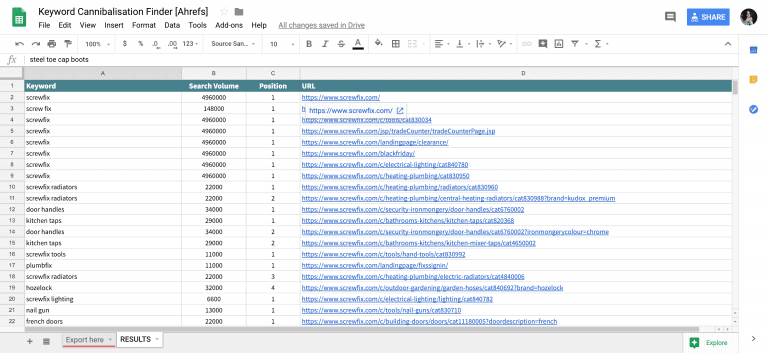
2.1 Step 1: Connect Google Search Console to Sheets
- Export Search Console Data:
- Navigate to Performance > Search Results in Google Search Console.
- Set the date range to 6–12 months for comprehensive data.
- Export queries, pages, clicks, and impressions as a CSV.
- Import Data into Google Sheets:
- Use
=IMPORTDATA("CSV_URL")or upload manually. - Organize columns: Keyword, Page, Clicks, Impressions, Position.
- Use
2.2 Step 2: Clean and Analyze the Data
- Remove Irrelevant Keywords:
Filter out branded terms (e.g., “yourblogname ETFs”) using:CopyDownload=FILTER(A2:E, NOT(REGEXMATCH(A2:A, “yourblogname”)) - Identify High-Intent Keywords:
Sort by “Clicks” to prioritize keywords driving traffic to financial tools or affiliate links.
2.3 Step 3: Detect Cannibalization with Formulas
- Flag Duplicate Keywords:
Use=COUNTIF(A:A, A2)to count how many pages rank for the same keyword.CopyDownload=IF(COUNTIF(A:A, A2)>1, “Cannibalization Risk”, “Safe”) - Compare Page Performance:
Add a column to calculate CTR (Clicks/Impressions) and highlight pages with overlapping intent:CopyDownload=IF(AND(C2/D2 > 0.05, COUNTIF(A:A, A2)>1), “Merge or Redirect”, “OK”) - Create a Pivot Table:
Group keywords by page count to spot clusters:CopyDownloadRows: Keyword | Values: COUNTUNIQUE(Page)
2.4 Step 4: Visualize Results with Charts
- Heatmap for High-Risk Keywords:
Use conditional formatting to highlight keywords with multiple pages (red = urgent). - Line Graphs for Position Trends:
Track whether competing pages are rising or falling in rankings over time.
2.5 Step 5: Automate with Google Apps Script
Set up weekly email alerts for new cannibalization risks:
function checkCannibalization() {
  const sheet = SpreadsheetApp.getActiveSpreadsheet().getSheetByName("Data");
  const keywords = sheet.getRange("A2:A").getValues();
  const duplicates = keywords.filter((k, i) => keywords.indexOf(k) !== i);
  if (duplicates.length > 0) MailApp.sendEmail("you@email.com", "New Cannibalization Alerts", duplicates.join("\n"));
}
Part 3: Fixing Cannibalization in Finance Content
3.1 Merge or Redirect Competing Pages
- Example: Combine “How to Save for Retirement” and “Retirement Savings Strategies” into one pillar post. Redirect the weaker URL to the stronger one using 301 redirects.
3.2 Refocus Keyword Targeting
- Use tools like Ahrefs or SEMrush to find long-tail variants (e.g., “best ETFs for dividends 2025” vs. “high-dividend ETFs”).
- Update meta titles, headers, and internal links to emphasize differences.
3.3 Leverage Internal Linking
Link from weaker pages to your “canonical” page to boost its authority:
<a href="/best-etfs-2025">Read our definitive guide to ETF investing here</a>
Part 4: Recommended Tools and Books
4.1 Essential SEO Tools
- Google Search Console: Free keyword tracking.
- SEMrush: Keyword gap analysis ($119.95/month).
- Screaming Frog: Crawl budget optimization (Free for 500 URLs).
4.2 Books for Mastering Content Strategy
- “SEO 2024: Learn Search Engine Optimization” by Adam Clarke
Amazon Link
Covers advanced cannibalization fixes for finance niches. - “Content Chemistry: The Illustrated Handbook for Content Marketing” by Andy Crestodina
Amazon Link
Teaches how to structure content clusters for investing blogs. - “The Personal Finance SEO Handbook” by Brian Dean
Amazon Link
Tailored tactics for ranking finance keywords without overlap.
Conclusion: Protect Your Content’s ROI
Building a keyword cannibalization checker in Google Sheets empowers you to take control of your finance blog’s SEO. By merging redundant pages, refining keyword targeting, and automating alerts, you’ll consolidate authority and drive more traffic to monetizable content like affiliate reviews or trading courses.
References
- Rows Keyword Cannibalization Checker
- Yoast’s Guide to Content Cannibalization
- Ahrefs’ Case Study on Merging Content
- SEOTesting’s Rank Tracking Tools
- StrategiQ’s Google Sheets Dashboard Guide
Books for Mastering Content Strategy
- SEO 2023: Learn Search Engine Optimization by Adam Clarke
Covers advanced keyword cannibalization fixes for finance blogs. - Content Chemistry: The Illustrated Handbook for Content Marketing by Andy Crestodina
Teaches how to structure content clusters for investing niches. - SEO for Everyone: A No-Nonsense Guide by Jesse McDonald
Practical SEO strategies for personal finance bloggers.