
Introduction: Why Meal Planning Is a Financial Power Move
For young professionals in finance, trading, or business, efficiency isn’t just a buzzword—it’s a lifestyle. Meal planning, often overlooked, is a cornerstone of financial discipline. By leveraging Google Docs (and its spreadsheet counterpart, Google Sheets), you can turn chaotic grocery runs into a calculated, ROI-driven process. This guide will show you how to optimize meal planning for cost savings, time management, and nutritional balance, all while aligning with your financial goals.
Section 1: The Financial Case for Meal Planning
1.1 The Hidden Costs of Unplanned Eating
- Impulse Purchases: The average household wastes $1,500 annually on unused groceries.
- Takeout Traps: Dining out costs 3–5x more than home-cooked meals.
- Time = Money: Weekly meal planning saves 3–5 hours otherwise spent on last-minute decisions.
1.2 Meal Planning as a Wealth-Building Habit
- Compound Savings: Saving 50/weekongroceriesaddsupto50/weekongroceriesaddsupto2,600 annually—enough to max out a Roth IRA contribution.
- Mindful Spending: Aligns with principles from “I Will Teach You to Be Rich” by Ramit Sethi, emphasizing intentional budgeting.
Section 2: Building Your Google Docs Meal Planning System
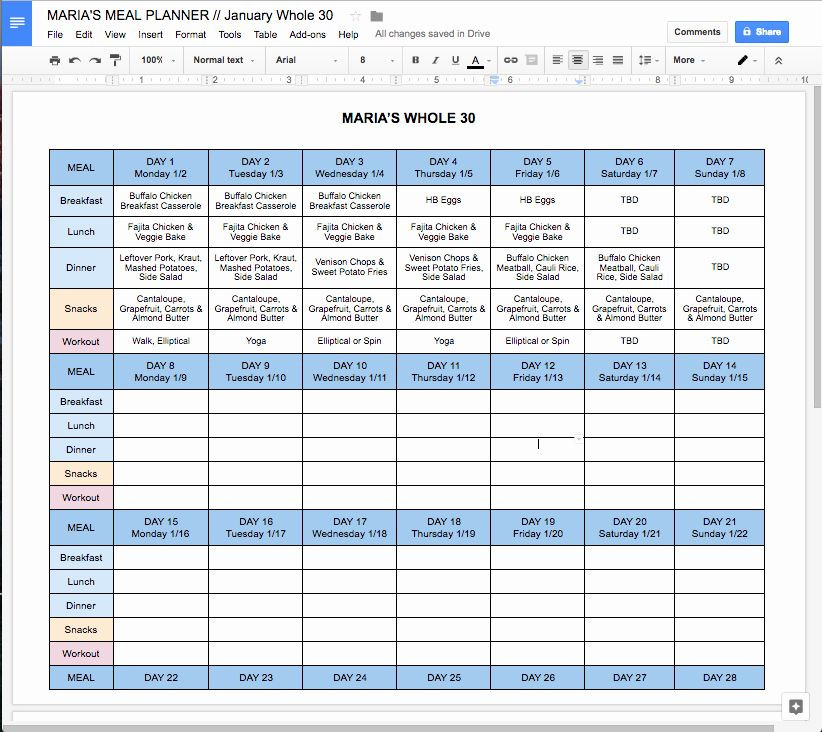
2.1 Step 1: Set Up Your Google Sheets Template
- Free Templates: Use pre-built templates like the Weekly Meal Plan with Grocery List or the Zero Waste Meal Planner.
- Customization Tips:
- Budget Tracking Column: Add a column for estimated meal costs.
- Pantry Inventory Tab: Catalog staples to avoid duplicate purchases.
- Aisle Organization: Group groceries by supermarket sections (e.g., produce, dairy) to minimize backtracking.
2.2 Step 2: Plan Meals Strategically
- Theme Nights: Assign categories like “Meatless Monday” or “Batch-Cook Thursday” to streamline decisions.
- Recipe ROI: Prioritize high-volume, low-cost meals (e.g., chili, stir-fries) that yield leftovers.
- Leverage Sales: Use the =IMPORTHTML function to pull weekly grocery deals into your sheet.
2.3 Step 3: Automate Your Grocery List
- Dynamic Lists: Link meal ingredients to a Grocery List Tab using =QUERY or =FILTER functions.
- Example:
=FILTER(MealPlan!C2:C20, MealPlan!B2:B20="Dinner")auto-populates dinner ingredients.
- Example:
- Budget Alerts: Set conditional formatting to flag items exceeding your per-meal cost threshold.
2.4 Step 4: Track Spending and Waste
- Expense Dashboard: Use =SUMIF to calculate weekly grocery totals.
- Waste Audit: Log spoiled items to adjust future plans—critical for minimizing “food shrink”.
Section 3: Advanced Tactics for Finance-Minded Planners
3.1 Bulk Buying and Batch Cooking
- Cost-Benefit Analysis: Compare unit prices (e.g., $/lb) for bulk vs. regular purchases.
- Freezer Optimization: Use Google Sheets to track frozen meals’ expiration dates.
3.2 Meal Prep as a Side Hustle
- Monetize Excess: Sell pre-portioned meals to colleagues using your Google Docs inventory tracker.
- Tax Deductions: Track kitchen expenses if meal prepping becomes a business (consult “Profit First” by Mike Michalowicz).
3.3 Collaborative Planning for Shared Expenses
- Shared Sheets: Split grocery costs with roommates using =SPLIT function.
- Real-Time Updates: Use Google Docs’ comment feature to coordinate meal preferences.
Section 4: Recommended Tools and Resources
4.1 Free Google Docs Templates
- Zero Waste Grocery List (Download Here).
- Monthly Meal Planner with Budget Tracker (Template Link).
- Keto Diet Meal Planner (Access Here).
4.2 Must-Read Books
- “The Total Money Makeover” by Dave Ramsey: Align meal budgeting with debt-free goals.
- “Cook Once, Eat All Week” by Cassy Joy Garcia: Batch-cooking strategies for busy professionals.
- “Atomic Habits” by James Clear: Build consistency in meal planning routines.
4.3 Apps for Synergy
- Tiller Money: Syncs bank transactions with Google Sheets for real-time budget updates.
- Pinterest: Save recipes directly to your meal plan using hyperlinks.
Section 5: Case Study – A 30-Day Financial Transformation
Sarah, 28, Financial Analyst
- Challenge: Spent $600/month on takeout and wasted 40% of groceries.
- Solution: Implemented a Google Sheets meal planner with budget alerts.
- Results:
- Reduced grocery spending by 35% ($390/month).
- Cut food waste to 10%.
- Reinvested savings into a robo-advisor portfolio.
Conclusion: Meal Planning as a Financial Leverage Tool
Google Docs isn’t just for spreadsheets—it’s a gateway to financial empowerment. By treating meal planning like a portfolio (diversify, optimize, track), you can unlock savings, reduce stress, and fuel your career hustle. Start with a free template, automate relentlessly, and watch your budget—and time—compound in your favor.
References
- Zero Waste Meal Planner Template: Link
- Weekly Meal Plan Google Sheets Template: Link
- Free Meal Planner Templates: Link
- 8 Free Google Sheets Meal Plan Templates: Link
- Simple Meal Planner Template: Link
- Monthly Meal Plan Rotation Hack: Link
- Free Monthly Meal Plan Template: Link
- Meal Planning for Beginners Guide: Link
- Budget-Friendly Meal Prep Strategies: “Cook Once, Eat All Week” by Cassy Joy Garcia.
- Financial Discipline and Meal Planning: “I Will Teach You to Be Rich” by Ramit Sethi.