
Introduction: Why Zero-Based Budgeting is the Millennial Money Hack You Need
Millennials face unique financial challenges: student loans, gig economy volatility, and rising living costs. Zero-based budgeting (ZBB)—where every dollar earned is assigned a purpose—offers a solution. Unlike traditional budgets, ZBB forces intentionality, making it ideal for those juggling side hustles, investments, or debt repayment 38.
Google Sheets is the perfect tool for this method: it’s free, collaborative, and customizable. This guide will walk you through creating a zero-based budget in Google Sheets, complete with templates, automation tips, and strategies to optimize your financial life.
Part 1: Understanding Zero-Based Budgeting
What is Zero-Based Budgeting?
ZBB requires allocating 100% of your income to expenses, savings, and debt until your income minus outflows equals zero. This method, popularized by Dave Ramsey, ensures no dollar goes unassigned.
Key Principles:
- Track Every Dollar: Assign roles to all income, whether for rent, groceries, or emergency funds.
- Flexibility: Adjust categories monthly to reflect changing priorities (e.g., a vacation fund one month, medical bills the next).
- Debt-First Mindset: Prioritize high-interest debt repayment, as seen in templates with dedicated debt tracking sheets.
Why ZBB Works for Millennials
- Adaptability: Ideal for irregular incomes (freelancers, side hustlers).
- Transparency: Visual dashboards in Google Sheets templates (like TheGoodocs’ pie charts) highlight spending patterns.
- Goal-Oriented: Aligns with milestones like homeownership or FIRE (Financial Independence, Retire Early).
Part 2: Building Your Zero-Based Budget in Google Sheets
Step 1: Choose a Template
Recommended Templates:
- Tiller Foundation Template: Automates transaction tracking and categorizes expenses (ideal for hands-off users).
- TheGoodocs Zero-Based Budget Template: Features interactive dashboards and multi-sheet organization.
- Debt-Focused Template: Includes debt snowball/avalanche calculators (use the template).
How to Access:
- Navigate to File > Make a Copy in Google Sheets to personalize any template.
Step 2: Input Income Sources
- Primary Income: Salary, freelance payments, or rental income.
- Secondary Streams: Dividends, side gigs, or cashback rewards.
- Irregular Income: Use the previous month’s earnings as a baseline (as advised by NerdWallet).
Pro Tip: Use =SUM() formulas to auto-calculate totals.
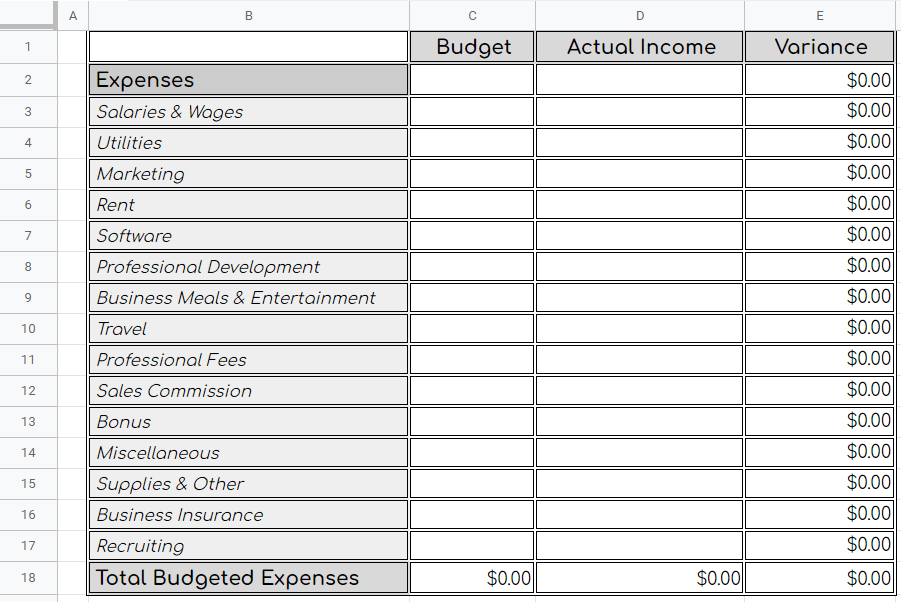
Step 3: Assign Expense Categories
Fixed vs. Variable Expenses:
- Fixed: Rent, subscriptions, loan payments. Templates like webpage 5’s split these into “Set” and “Adjustable” expenses.
- Variable: Groceries, entertainment, discretionary spending.
Sample Categories for Millennials:
- Debt Repayment: Student loans, credit cards.
- Investing: Robinhood deposits, crypto allocations.
- Self-Care: Gym memberships, mental health apps.
Step 4: Allocate Every Dollar
- Prioritize Essentials: 50% to needs (rent, utilities), 30% to wants, 20% to savings/debt (50/30/20 rule) 39.
- Zero Out Remaining Funds: If you have $200 left after bills, assign it to an emergency fund or Roth IRA.
Template Hack: Use conditional formatting to highlight overspending (e.g., red cells for negative balances).
Step 5: Automate Tracking
- Link Bank Feeds: Tiller’s integration auto-imports transactions into Google Sheets.
- Use Apps like Plaid: Sync accounts for real-time updates.
- Set Monthly Reminders: Use Google Calendar alerts to review budgets.
Part 3: Advanced Strategies for Financial Success
1. Tackling Debt with the Snowball Method
- List debts from smallest to largest. Allocate extra funds to the smallest balance first (motivational wins).
- Track progress using a debt payoff chart (included in templates).
2. Building an Emergency Fund
- Aim for 3–6 months of expenses. The template from webpage 1 calculates targets based on income.
- Automate transfers to a high-yield savings account (e.g., Ally Bank).
3. Investing Surplus Funds
- Allocate “leftover” money to index funds (Vanguard S&P 500) or micro-investing apps (Acorns).
- Use the “Investments” category in TheGoodocs template to track growth.
4. Handling Variable Income
- Create a “Buffer” category: Save 10% of high-earning months to cover low-earning ones.
- Use the “Income Smoothing” sheet in Tiller’s template to average earnings.
Part 4: Troubleshooting Common Issues
Problem: Overspending in categories.
Solution:
- Adjust next month’s budget or move funds from “wants” to cover shortages.
- Use the “Adjustable Expenses” section in templates to reallocate.
Problem: Irregular bills (e.g., annual subscriptions).
Solution:
- Create a “Sinking Fund” category. Divide annual costs by 12 and save monthly.
Problem: Lack of motivation.
Solution:
- Enable visual charts (TheGoodocs’ dashboards) to see progress.
- Join Reddit communities like r/Zer0budgeting for support.
Part 5: Recommended Tools & Resources
Books to Deepen Your Knowledge:
- The Total Money Makeover by Dave Ramsey – ZBB fundamentals.
- I Will Teach You to Be Rich by Ramit Sethi – Automating finances.
- Your Money or Your Life by Vicki Robin – Aligning spending with values.
Free Templates:
Apps for Syncing:
- Tiller Money – Auto-import transactions.
- PocketSmith – Forecast cash flow.
Conclusion: Your Path to Financial Empowerment
Zero-based budgeting in Google Sheets isn’t just about spreadsheets—it’s about designing a life where money serves your goals. By leveraging templates, automation, and mindful spending, you can conquer debt, build wealth, and gain peace of mind. Start today, and watch your financial confidence grow one cell at a time.
Ready to Begin?
- Click a template link above.
- Customize it to your lifestyle.
- Share your progress with #MillennialMoneyMastery.