
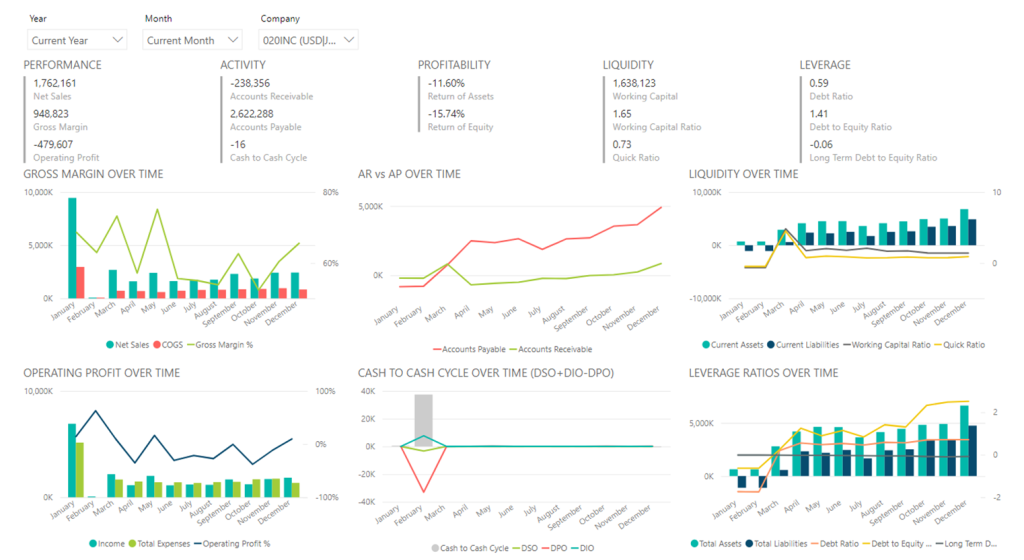
Startups thrive on agility, innovation, and—let’s face it—sheer grit. But even the most disruptive ideas can crash and burn without a solid grasp of financial health. While metrics like Monthly Recurring Revenue (MRR) and Customer Acquisition Cost (CAC) get all the glory, many startups overlook deeper, equally critical financial indicators.
Enter Power BI, Microsoft’s powerhouse data visualization tool. It’s not just for Fortune 500 companies; startups can leverage it to transform raw data into survival strategies. In this guide, we’ll uncover five underrated financial metrics that could make or break your startup, and show you how Power BI can turn these numbers into actionable insights.
1. Burn Rate vs. Runway: Knowing When the Clock Ticks
What Are Burn Rate and Runway?
- Burn Rate: The rate at which your startup spends cash monthly.
- Runway: How many months you can operate before funds dry up.
Why Startups Overlook Them
Founders often fixate on revenue growth, forgetting that unchecked spending shortens their runway. A Crunchbase report found that 29% of startups fail due to cash shortages—a preventable disaster.
How Power BI Helps
- Visualize Cash Trajectories: Create dashboards linking burn rate to revenue forecasts.
- Scenario Analysis: Model “what-if” scenarios (e.g., delayed funding rounds).
Pro Tip: Use Power BI’s AI-driven forecasting to predict runway under different burn rates.
Real-World Example: A SaaS startup reduced burn by 20% after visualizing non-essential SaaS subscriptions in Power BI.
2. Customer Lifetime Value (LTV) to CAC Ratio: The Growth Compass
What Is LTV:CAC?
- LTV: Total revenue a customer generates.
- CAC: Cost to acquire that customer.
- Healthy Ratio: 3:1 (LTV 3x CAC).
Why It’s Overlooked
Startups often prioritize scaling over unit economics. A 2023 ProfitWell study found that 40% of startups with high growth had LTV:CAC ratios below 2:1, risking profitability.
Power BI to the Rescue
- Dynamic Cohort Analysis: Track LTV trends by acquisition channel.
- CAC Breakdown: Visualize CAC by marketing spend (ads, influencers, etc.).
Pro Tip: Embed Power BI with CRM tools like HubSpot to auto-update LTV:CAC dashboards.
Case Study: An e-commerce startup doubled its ROI by reallocating ad spend after spotting underperforming channels in Power BI.
3. Net Revenue Retention (NRR): The Silent Growth Engine
What Is NRR?
- Measures revenue retention from existing customers (including upsells, downgrades, churn).
- Formula: (Ending Revenue + Upgrades – Downgrades – Churn) / Starting Revenue
Why Startups Ignore NRR
Early-stage teams focus on new customers, but Bain & Company notes that a 5% increase in retention boosts profits by 25–95%.
Power BI’s Role
- Churn Prediction: Use AI visuals to flag at-risk accounts.
- Upsell Tracking: Highlight expansion revenue trends.
Pro Tip: Pair Power BI with Zendesk to correlate customer support tickets with churn.
Example: A fintech startup boosted NRR by 15% after identifying high-churn user segments.
4. Gross Margin by Product Line: Profitability’s Hidden Map
What Is Gross Margin by Product Line?
- Profitability of individual products/services after direct costs.
The Oversight
Startups often lump margins together, masking underperformers. As Eric Ries emphasizes in The Lean Startup, “Success is not delivering a feature; it’s solving a problem profitably.”
Power BI Strategies
- Product-Level Dashboards: Compare margins across SKUs.
- Cost Driver Analysis: Visualize how material/ labor costs impact margins.
Pro Tip: Use Power BI’s Q&A feature to ask natural questions like, “Which product has the lowest margin?”
Case Study: A DTC brand discontinued 3 low-margin products after Power BI analysis, boosting overall margins by 30%.
5. Cash Conversion Cycle (CCC): The Liquidity Lifeline
What Is CCC?
- Days it takes to convert inventory and receivables into cash.
- Formula: Inventory Days + Receivable Days – Payable Days
Why It’s Ignored
Cash flow struggles are often reactive. Startups with negative CCC (like Amazon) get paid before paying suppliers, but few track it proactively.
Power BI Tactics
- CCC Trend Lines: Monitor how operational changes affect liquidity.
- Supplier/Customer Analysis: Identify bottlenecks in payables/receivables.
Pro Tip: Integrate Power BI with QuickBooks for real-time CCC tracking.
Example: A hardware startup reduced CCC by 25 days by renegotiating supplier terms after Power BI insights.
Setting Up Power BI for Financial Success
Step 1: Data Integration
- Connect Power BI to accounting software (Xero, QuickBooks), CRMs, and spreadsheets.
Step 2: Build Custom Dashboards
- Use pre-built templates or create visuals like:
- Runway Countdown Clock
- LTV:CAC Heatmaps
- NRR Trend Lines
Step 3: Automate & Share
- Schedule automatic data refreshes.
- Share dashboards with stakeholders via Power BI Service.
Recommended Books
- “Lean Analytics” by Alistair Croll & Benjamin Yoskovitz – Master metrics that matter.
- “Financial Intelligence for Entrepreneurs” by Karen Berman & Joe Knight – Decode financial statements.
- “Data-Driven” by DJ Patil & Hilary Mason – Cultivate a data-first mindset.
- “The Startup Owner’s Manual” by Steve Blank & Bob Dorf – Step-by-step scaling strategies.
- “Measure What Matters” by John Doerr – OKRs for focused growth.
References
- Crunchbase: Why Startups Fail
- ProfitWell: LTV:CAC Benchmarks
- Bain & Company: The Economics of Retention
- Microsoft Power BI Documentation
- Investopedia: Cash Conversion Cycle
Final Thoughts
In the startup world, what you don’t know can hurt you. By leveraging Power BI to track these five metrics, you’ll gain a financial edge that’s proactive, not reactive. Remember: Data isn’t just numbers—it’s your roadmap to survival and scale.
Ready to dive deeper? Share this guide with your team, grab a recommended book, and start building your Power BI dashboards today. Your future self (and investors) will thank you.